
Sending a Message
Clubspot can facilitate sending a message via email, SMS, and push notification. There are two primary workflows to compose and send an email.
#1: Use Filters to send an email
1. Navigate to your Clubspot account's Membership page (or any page where there is a filter and Message Icon)
2. Click "Add Filter."
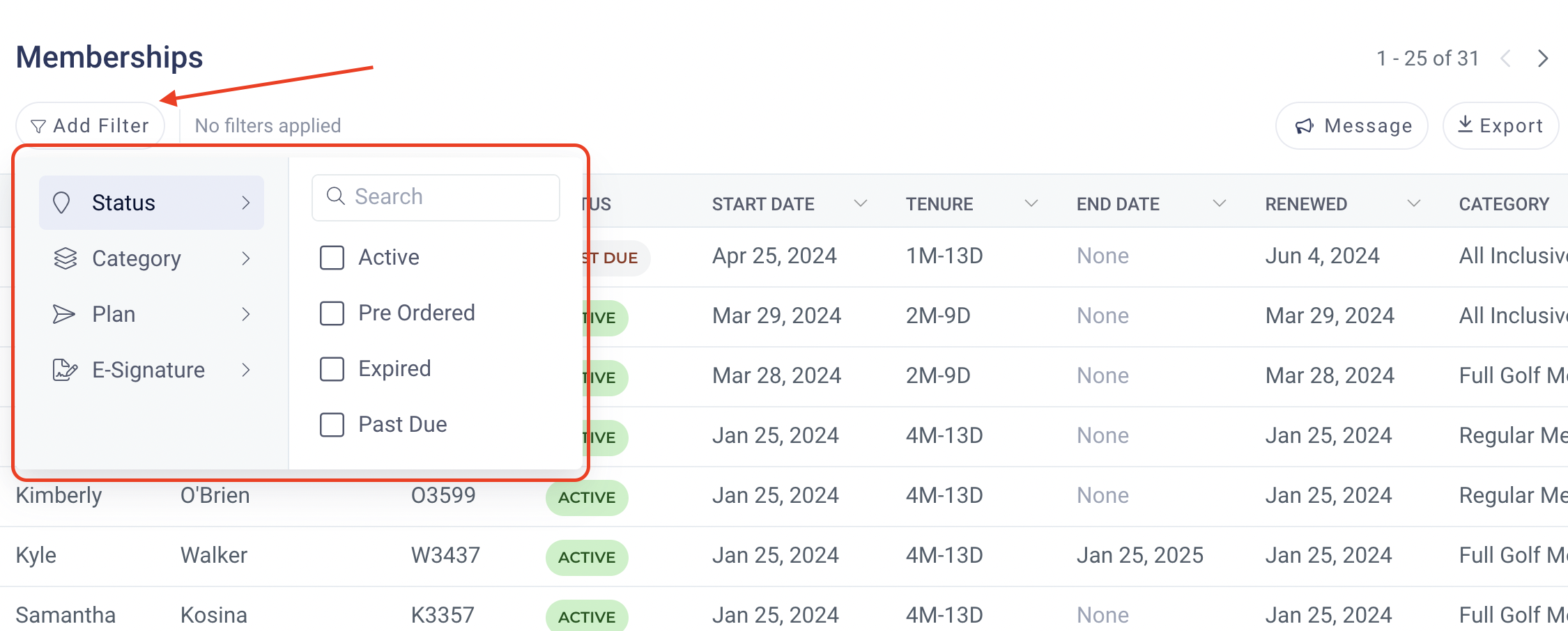
3. Select the respective Status, Category, Plan, and/or E-Signature filter to sort the Membership list
4. Click "Message" to the Email or SMS text respective membership list
5. After clicking message you can select what group of members to blast, either ALL members or only the primary member. Then select the Message type (Email, SMS/Text, or Push Notification)
6. Once the method is selected, you can start to draft the content. Clubspot now supports Templates and more advanced email capabilities through Clubspot Email.
#2 Use Contact Lists to send an email
1. Navigate to your Clubspot account's Communication section and select Contact Lists. Here you’ll find the default all members/primary members lists as well as any Member Groups or custom contact lists.
2. Click on the list and send an email
3. Once the Email is selected, you can start to draft the email content. Clubspot supports Templates and more advanced email capabilities through Clubspot Email. Learn more here Clubspot Email
Schedule Sending Communications
1. Once you’ve drafted your email, click the menu carrot next to the send button
2. Select Schedule from the list of options
3. Enter the date and time the email should be sent (anytime up to 30 days in advance).
4. Scheduled emails can be reviewed, archived, and un-scheduled to make edits under the Communication > Scheduled section. Please note, the recipient list on the scheduled email will only include those that were on the recipient list when the email draft was first created.