
Online Court Booking
Players can book courts online via our native court reservation page.
Online Access
Players can book courts using this interface found at yourclubdomain.com/court-booking. Most clubs like to link to the booking page from their Clubspot-powered website or app. You can also find your booking link from the dashboard under Courts > Schedules.
If you'd like this URL to be inaccessible to guests, please reach out to support@theclubspot.com to enable members-only visibility.
Player-Facing Court Booking
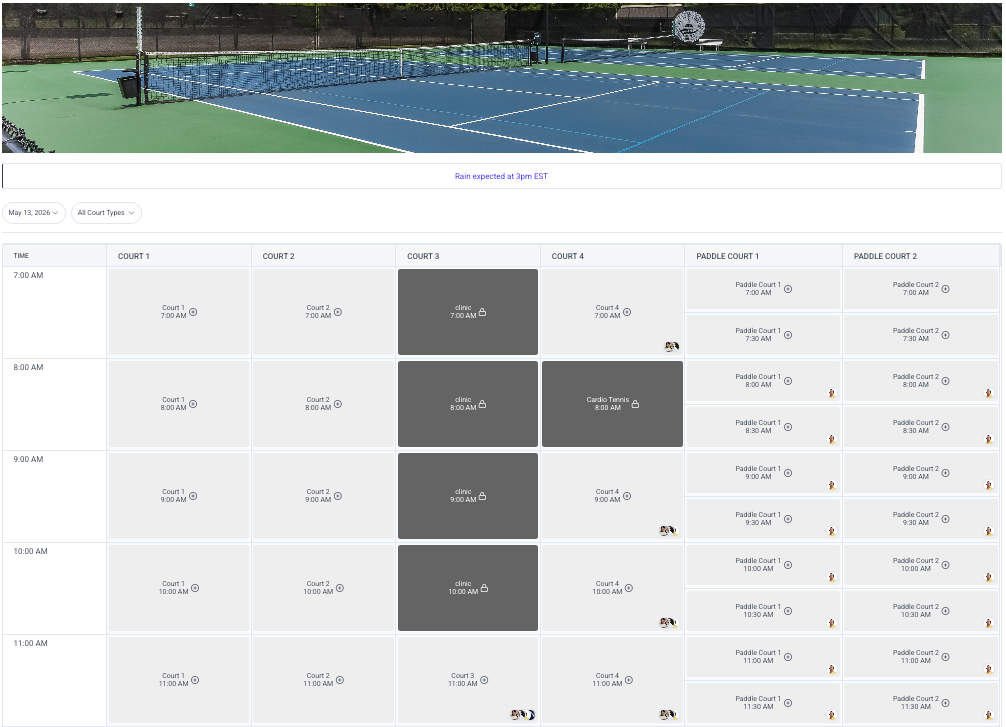
A player can click on any available time slot to reserve the court. They'll be prompted to indicate the number of players and the duration of the booking. If your court schedule has been programmed to limit the number of bookings in a given window, the member will be able to see their remaining allowed bookings
When a member is logged in, they’ll see their upcoming bookings listed along the top for easy viewing and cancellation.
Reservation hold
To prevent multiple members from simultaneously booking the same court, the registration is held once the user selects the duration of the booking. Members and admins have 2 minutes to complete the registration process before the court becomes available for a new booking.
Book a Pro
If you enable the private lesson feature, members will be able to add a pro to their reservation to turn a court booking into a private lesson, without the hassle of coordinating with the pro directly.
Booking Page Customizations
The hero image at the top of your booking page can be set by the Clubspot team. Please reach out if you'd like us to update this image on your behalf.
The note at the top of your booking page can be set directly from your admin dashboard. Head to Courts > Calendar, and you'll find the option to display a court note. This messaging is used for a standing message, such as "All players must check in before play via the pro shop."
If you’d like to prevent players from booking multiple overlapping/conflicting court bookings, please let Clubspot support know.
If you’d like to be able to pre-filter the booking URL to a specific court type (i.e., take them directly to pickleball courts instead of showing all courts), please reach out to support@theclubspot.com, and we can enable this feature!