
Member Statement format
This guide explains how to read a statement. The statement is the document sent to a member each month to summarize the invoices, adjustments, and previous balances that contribute to their current amount owed.
Sample statement snapshot
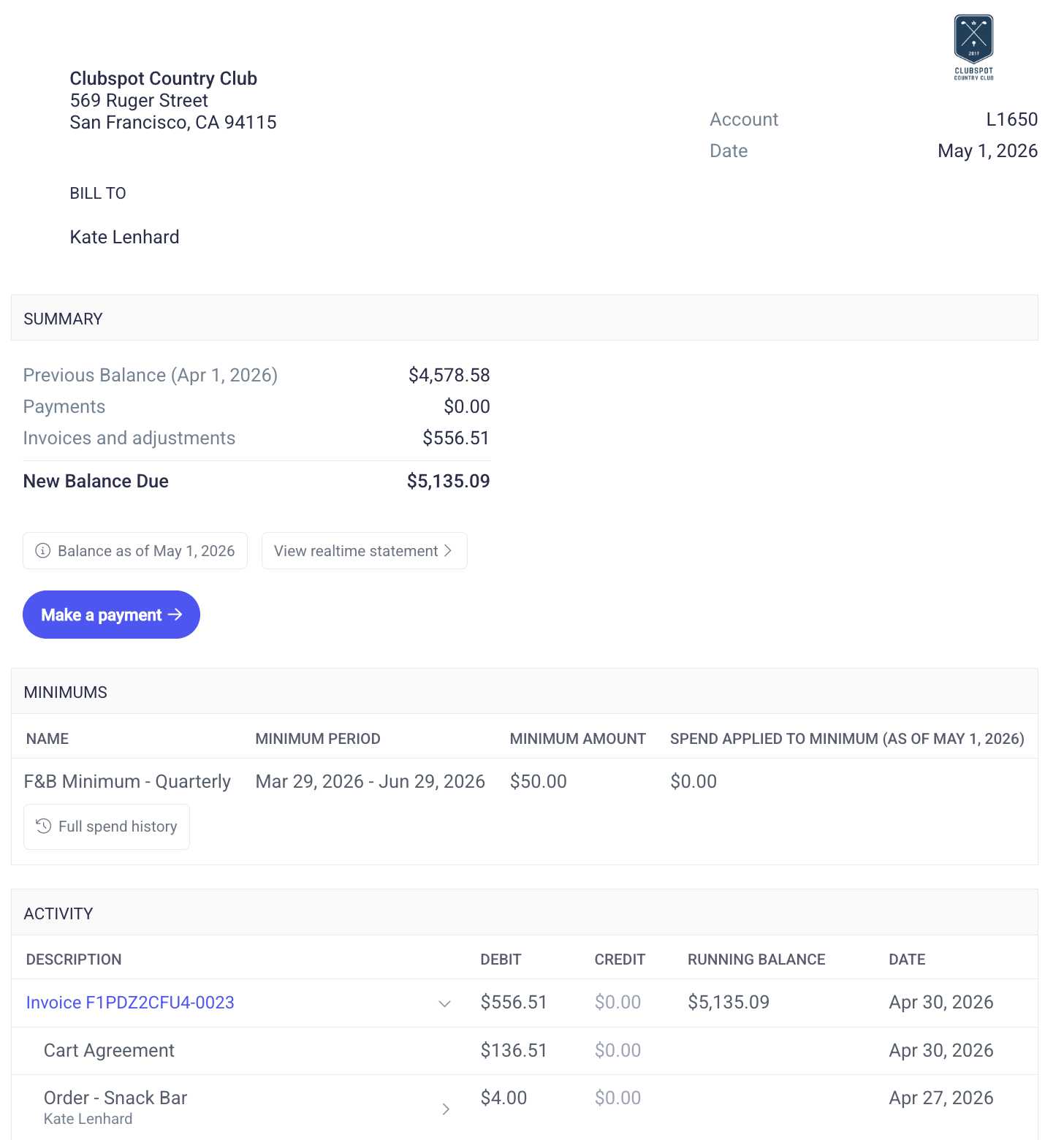
Bill to
The Bill to section displays the club burgee/logo and member details, including name, address, and account (member) number. It also displays the invoice number, the date the invoice was issued, a due date (if any), and the current status of the invoice.
Clubspot invoices are designed to be printed, tri-folded, and placed in a standard envelope so that the member’s name and address appear in the window. To customize the position of the address to fit your preferred envelopes, please contact support@theclubspot.com.
Summary
The Summary section displays three key figures:
Previous balance - The member’s balance just before this invoice was issued.
Invoice total - The sum of all the line items on this invoice.
Total due - the balance due immediately after the invoice was issued - this will always equal Previous balance + Invoice total.
These figures all represent member balance at a specific moment in time (when the statement was issued). Members can also click a link to view their Realtime Statement, which always shows the current balance due.
Memo (optional)
The memo field typically displays the default memo that you have configured across all club invoices. To change this field, please navigate to your Membership > Billing page and customize the invoice memo text box.
Minimum (optional)
While minimum spend is always visible in the member's portal, you may also elect to include it on their monthly statement for additional transparency. If so, please reach out to support@theclubspot.com so we can enable that option for you.
Activity
The activity section displays each of the debits and credits that have contributed to the current membership balance. Most of these debits will be the result of an invoice, whether that is a membership dues invoice, a tab invoice, or a standalone invoice. If you'd like to change the way these invoices are presented on the statement, you can navigate to your Membership > Billing page and edit the formatting configuration to one of three options
Collapse lines: The statement is consolidated to display each invoice number. To see what charges are on the invoice, simply click on it. You'll then see each order that was present on the invoice. Click again to expand it to see the items on each order.
Expand invoices: The statement's invoices are already expanded. Click on each order to expand further and view each item purchased.
Expand invoices and orders: The statement's invoices and orders are already expanded and the customer can view every detail at a glance.
Address
The club's address listed at the bottom of the statement is inherited from the club's Stripe account for payment processing. If you'd like to update this field to a P.O box or alternative mailing address, please reach out to support@theclubspot.com with the preferred address.