
Reciprocal Member Payments
Reciprocal payments allow members of other clubs to purchase items at your club’s point of sale. Clubspot makes it easy to support these types of charges if your club would like to accept them.
By default, reciprocity is disabled on your Point of Sale. Please contact support@theclubspot.com to enable reciprocity.
Setting the customer
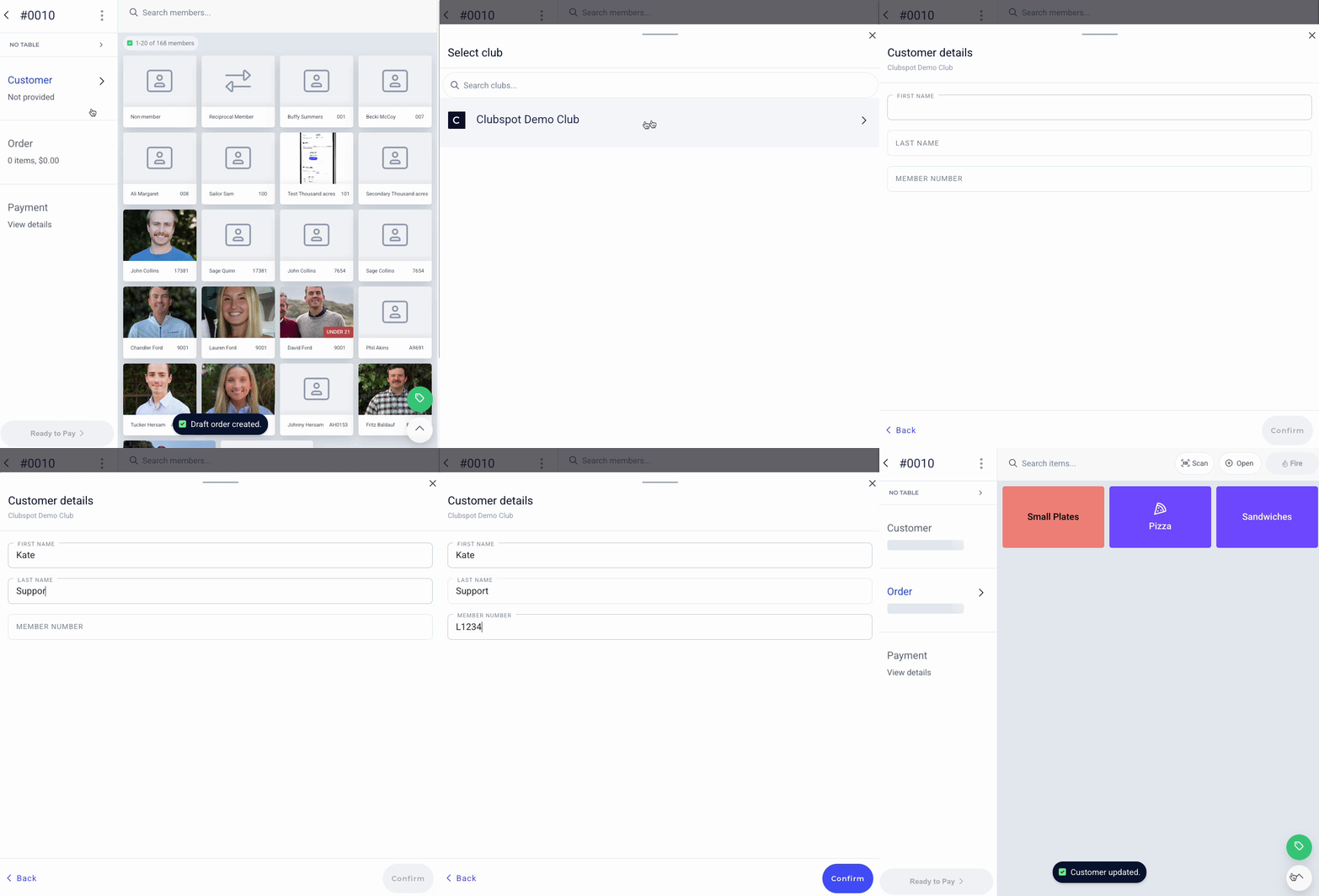
When reciprocity is enabled on your account, the Point of Sale will display a Reciprocal Member option on the Customer view.
When prompted, select the reciprocal member’s club and enter their name and member number.
Processing a payment
Processing a reciprocal payment is as simple as choosing 'house account' as the payment method to complete the charge. Clubspot will record the payment on the reciprocal club’s account and record the specific member’s payment details.
Reciprocal members can also pay with a card, check, or cash at the POS. Clubspot will still store the reciprocal member details so that you know that the customer was a reciprocal member. For reporting purposes, reciprocal charges are recorded as member revenue (as opposed to non-member revenue).
Reporting & reconciliation
The simplest way to collect payment from a reciprocal member is with a card reader at the point of sale. The reconciliation guide below applies to true reciprocal charges, where Clubspot creates a record of the payment, and you collect funds from the reciprocal member’s home club.
Reciprocal charges are invoiced to the reciprocal club’s account, which is a special type of membership in your membership database. This means that reciprocal invoices impact your Accounts Receivable, and from an accounting standpoint, they behave just like charges to members of your own club.
Reciprocal clubs can pay their statements online, just like members. They can also pay offline. If a reciprocal club sends you a check, you can record that payment on their account, just like you would for a normal membership account. Reciprocal statements will differ from standard statements because they have a membership number and name listed next to every single order. That provides the reciprocal club with the information they need to bill their member for that order.
Wildcard reciprocal charges
If there is a list of clubs that are less common but possible to accept reciprocal charges from, Clubspot Support can enable an “Other” club button at the top of the club list. These will go to a single reciprocal account, and then you can collect payment from other clubs and record it against that account.
You can easily identify reciprocal orders from the dashboard and from the Orders export. To generate a list of orders to send to a reciprocal club, follow these steps:
Navigate to the POS > Orders tab
Select the date range of your choice
Click to export the orders for that time period
In the export, you will see columns for Reciprocal Member, Reciprocal Club, and Reciprocal Member Number. Filter your export down based on these columns, so you can send the list to another club.