
Manage Club Administrators
Clubspot provides fine-tuned controls to grant access to specific areas or functions within the dashboard.
Invite a new administrator
To invite a new administrator, navigate to the Account tab on the left side menu, and follow these steps:
Click “+ new admin” in the top right corner of the screen.
Enter the administrator’s name and contact information
Select the access levels that you would like to grant the new administrator, then click to send the invitation. A unique invitation link will be visible that can be sent directly to the user in the event they’re unable to locate their invite email.
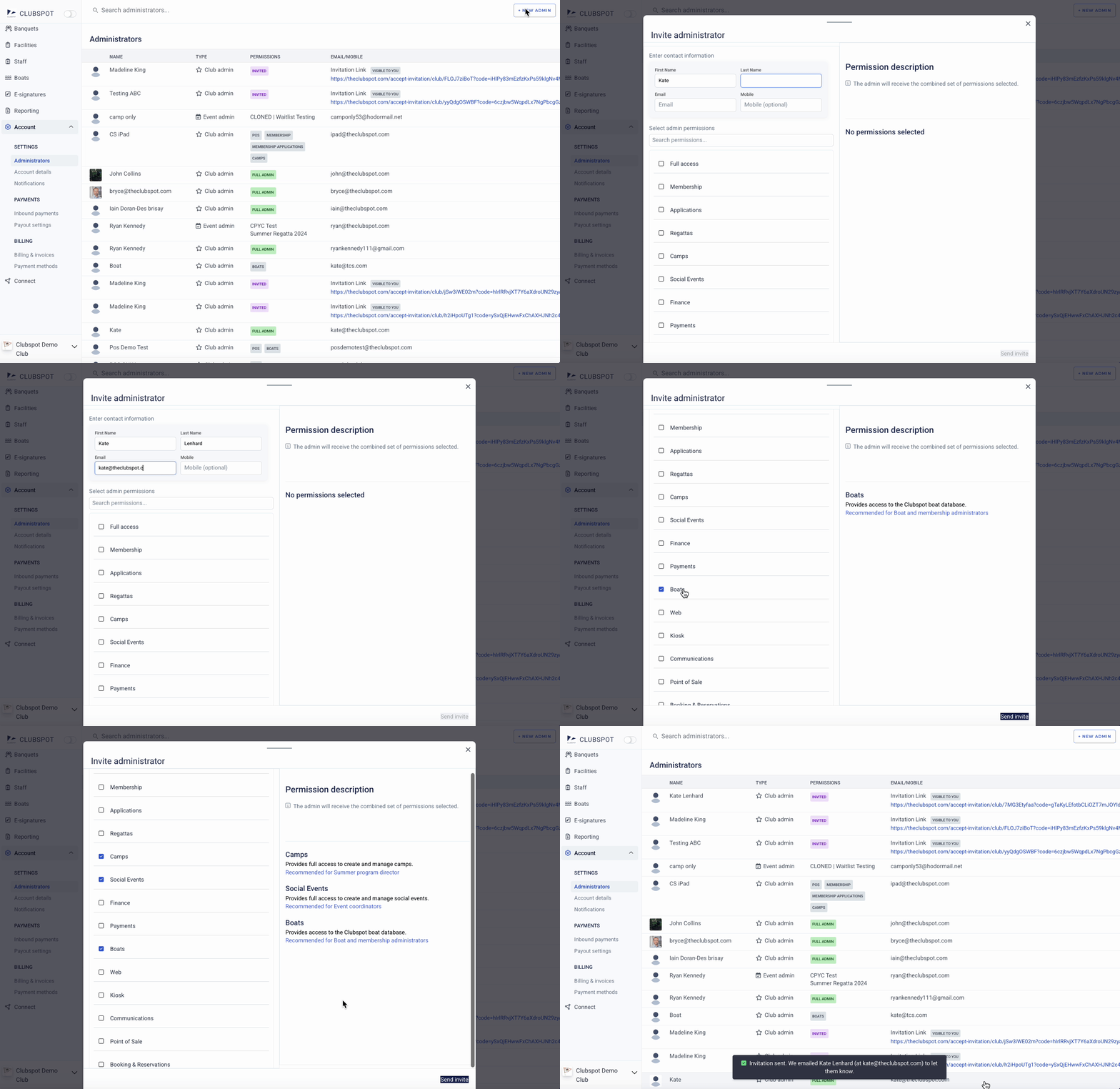
Access level overview
Full Access - Provides full access to manage this club, including membership, regattas, camps, accounting, website, and more. Recommended for Club Manager.
Membership - Provides full access to manage membership (including membership applications). Recommended for General manager, Board.
Applications - Provides access to manage membership applications. Recommended for Membership committee.
Regattas - ****Provides full access to create and manage regattas and series. Recommended for PRO, Fleet captains
Camps - Provides full access to create and manage camps Recommended for Summer program director
Social Events - Provides full access to create and manage social events. Recommended for Event coordinators
Finance - Provides access to accounting and reports, and facilities. Recommended for Controller, Treasurer, Bookkeeper
Payments - Provides access to manage stored payment methods, and make payments on behalf of your club. Recommended for Controller, Treasurer, Bookkeeper, Program Director
Boats - Provides access to manage club member boat details and information.
Web - Provides access to the Clubspot Website Builder. Recommended for IT, Social media chair
If the admin has Web access, you’ll be able to further restrict the pages they’re able to manage.
Kiosk - Provides access to the membership check-in kiosk.
Communications - ****Provides access to manage club communications, including bulk email and SMS. Recommended for Communications director, Social media chair
Point of Sale - Provides full access to manage point of sale terminals, plus add or remove lower level POS users (employees). This permission is for managers, NOT for individual employees using the POS system. Recommended for Club administrator, Food & Beverage manager
If the admin has Point of Sale permission, you’ll be able to further restrict the subtype of products they’re able to access.
Booking & Reservations Provides full access to manage booking & reservations. Recommended for Club administrator, Front Desk manager
Connect - Provides access to the Connect dashboard to view reciprocal memberships and event data between Clubspot Demo Club and other clubs/organizations.